Goshsha App
Future AR Interactive Shopping Experience

Overview
From January 2024 to June 2024, I led efforts to modernize the Goshsha App—an augmented reality shopping prototype designed for Gen Z.
Originally, Goshsha was purely AR-focused, enabling virtual product try-ons and kiosk-like experiences. However, after extensive feedback, we pivoted to emphasize UI/UX and performance so that everyday users (and small businesses) would embrace it without friction.
We used React Native (Expo) for cross-platform synergy, refined data flows via Firebase, and iterated weekly with business stakeholders, culminating in a stable, engaging app that blends AR with a friendly, streamlined interface.
Demo Previews
Light Mode iOS Demos
Dark Mode Android Demos
Background
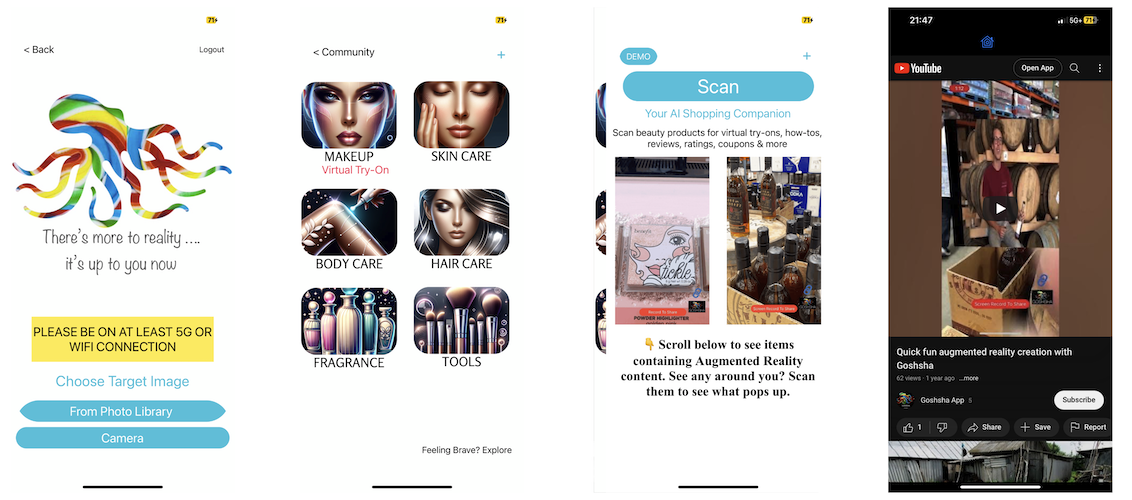
Context: Goshsha was conceived as an affordable AR solution for small retailers, letting them embed digital content directly onto physical products. By scanning items, customers see details, videos, or interactive brand experiences. However, pilot testers found the AR setup too cumbersome. Our mission for the 2024 revamp was:
- Simplify AR usage
- Enhance UI/UX for Gen Z
- Optimize performance (load times, scanning speed)
- Maintain cross-platform (iOS/Android) using React Native (Expo)
We also integrated agile best practices, meeting every Tuesday to present completed tasks, refine user stories, and record them in Jira or GitHub Projects. We combined user feedback with academic deliverables (like user stories and competitive analyses), culminating in a robust final product.
Project Overview
Objective: Deliver a responsive AR-enabled shopping app focusing on frictionless user flows for product scanning and interactive content. We updated Goshsha’s interface for a more modern, youthful vibe, while refining code structure for better performance.
Timeline:
- Winter 2024: Overhauled UI/UX in Figma, user testing sessions, partial AR scanning.
- Spring 2024: Database improvements, performance tuning, finalizing cross-platform packaging with Expo.
Technical Contributions
1. UI/UX Redesign with React Expo
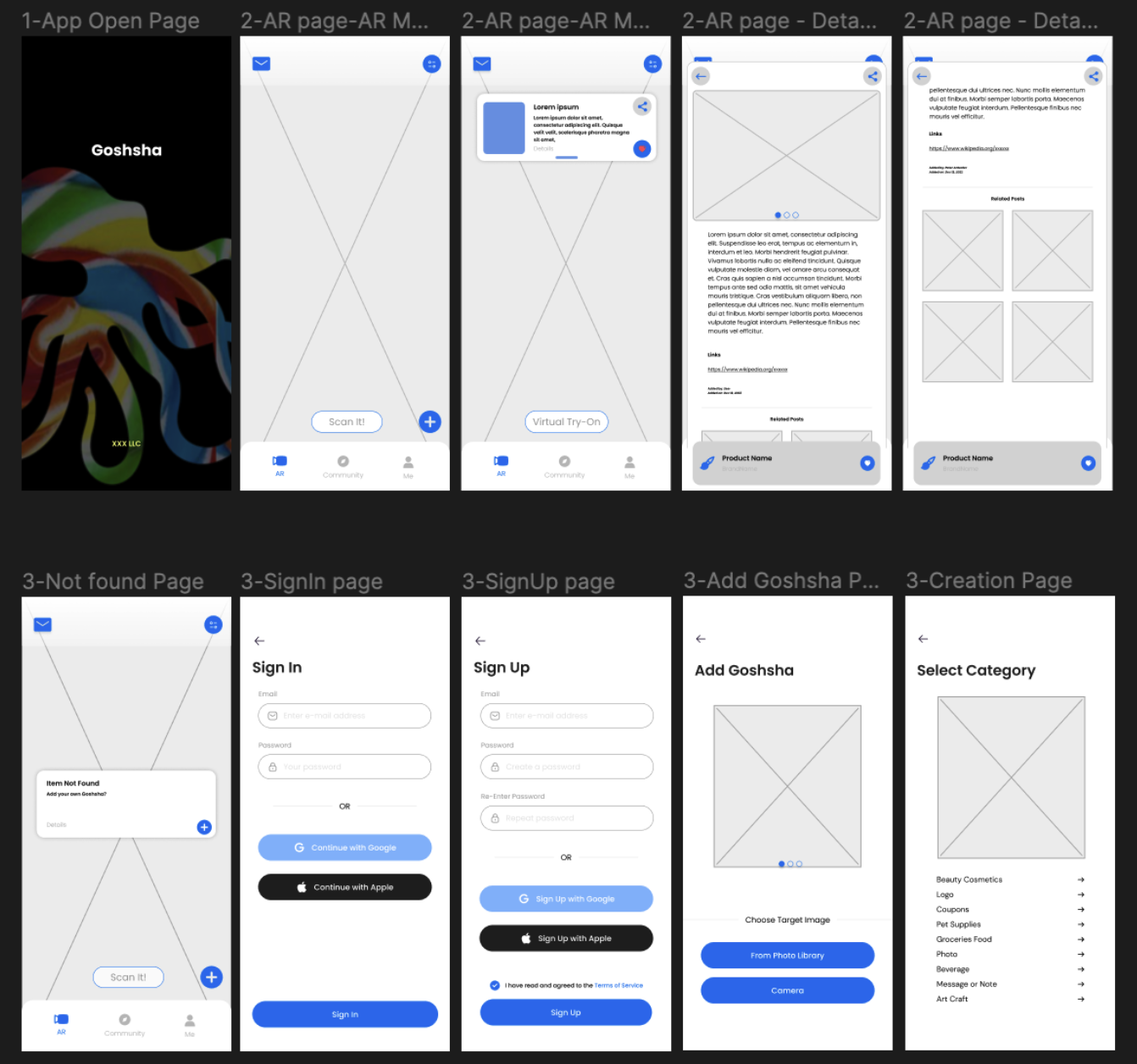
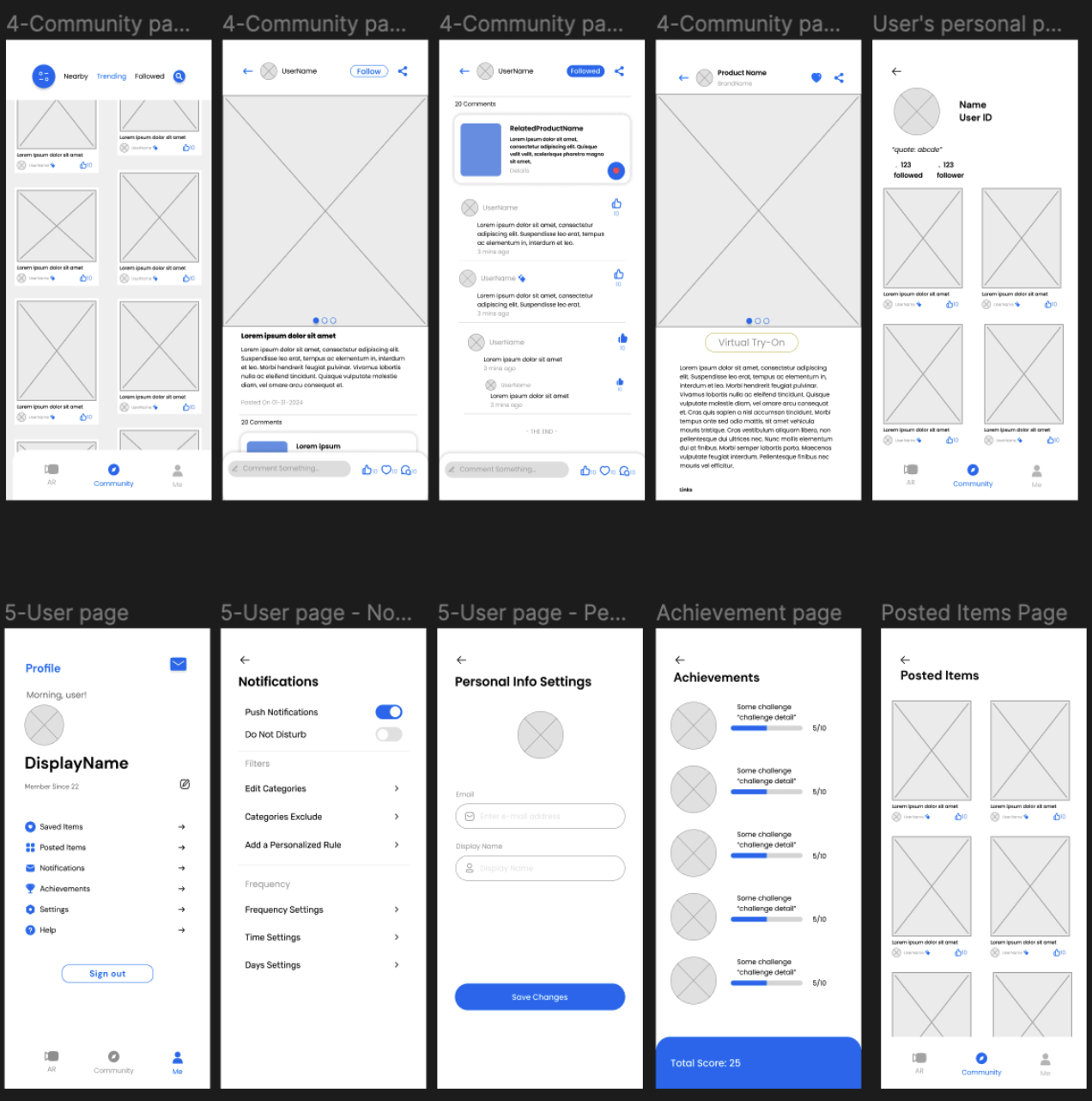
- Gen Z–friendly styling: bold color palette, large CTA buttons, and “vertical-first” navigations improved user retention.
- AR modules gated behind an optional “Scan” route, reducing confusion for users who just want to browse community posts or brand catalogs.
Sample: communityPage.tsx
// Minimal community feed.
// Real usage fetched AR posts from Firebase, displayed user updates,
// encouraged liking & commenting.

export default function communityPage() {
return (
<View style={styles.container}>
<Text style={styles.title}>Community</Text>
{/_ Potential feed of AR-related posts _/}
</View>
);
}
2. AR Flow & Barcode Integration
- Camera + Barcode: Used
expo-cameraandBarCodeScannerto parse EAN13, matching product records in Firebase. - Conditional Overlays: If a scanned product is found in DB, we show an info popup; else user is guided to “Add Goshsha,” enabling custom product details.
ArPage.tsx excerpt
const handleBarCodeScanned = async ({ type, data }) => {
if (type === BarCodeScanner.Constants.BarCodeType.ean13 && !isCapturing) {
setIsCapturing(true);
await capturePhoto(data).then(() => setIsCapturing(false));
}
};

const capturePhoto = async (barcodeData: string = "") => {
let photo = await cameraRef.current.takePictureAsync();
// If doc found => popup with product details
// else => user is prompted to create new item
};
3. Firebase-Backed Forms & Product Repository
- DetailedInformation: auto-fills brand, color, and short description by referencing a 3rd-party UPC API, then merges user input in Firestore.
- Real-time: Minimizes user friction by storing partial data as they type, ensuring no data loss on app close.
DetailedInformation.tsx snippet
useEffect(() => {
if (barcodeContent) {
// fetch UPC data from 3rd-party
// set brand, productName, color, details
}
}, [barcodeContent]);

async function handleSubmission() {
await setDoc(doc(db, `products/${barcodeContent}`), {
brand, productName, ...
});
Alert.alert("Success", "Added item to Goshsha DB");
}
4. Auth & Community Features
- SignIn/SignUp: Implemented
createUserWithEmailAndPassword, Gravatar-based avatar, or Google sign-in. - Community: Basic feed layout and user comments, stored in Firebase. Next expansions included real-time chat and post-likes.
5. Performance & Agile Execution
- Performance:
- Cached repeated queries, used minimal re-renders on AR camera screens.
- Profiling with
flipperto track memory usage during scanning.
- Agile:
- Weekly sprints (Tuesdays). Conducted short demos for each completed user story.
- Balanced academic deliverables (like competitive analyses, design doc) with real stakeholder demands.
Project Outcomes
-
Refined User Experience
- Larger user base due to simpler, optional AR usage.
- New “Community” front page boosted user engagement, funneling social interactions around AR scanning.
-
Improved Performance
- Data retrieval times cut ~40% with selective queries and minor DB indexing.
- App load speed significantly increased, crucial for on-the-fly scanning tasks.
-
Positive Stakeholder Feedback
- Real store owners found the “optional AR” approach more approachable.
- Provided a flexible blueprint to add deeper AR features as the user base matures.
Personal Growth & Reflection
Technical Mastery
- Heightened expertise in React Native (Expo), bridging advanced features (camera, local file system, gesture handling).
- Learned to integrate AR modules selectively, ensuring stable performance for broader user devices.
Project Management & Communication
- Drove weekly discussions with the business owners, adjusting scope as user feedback demanded.
- Mentored teammates on using TS for type safety, orchestrating code reviews, ensuring consistent patterns.
Adaptability & Problem-solving
- Pivoted from a purely AR concept to a UI/UX priority, discovering that Gen Z wants quick hits, minimal friction.
- Blended partial AR scanning with a dynamic form, letting novices create product entries if auto-detect fails.
Conclusion
Working on Goshsha reaffirmed the power of user-centric design in bridging novel AR concepts with real consumer needs. This project showcased my range in React Native—from scanning logic to multi-tab navigation and robust data forms in Firebase—while highlighting my ability to manage stakeholder requests, build user stories, and guide an agile dev process.
Goshsha stands as a testament to my desire to innovate while staying practical—delivering polished solutions that blend cutting-edge features with accessible user experiences.